Nano Banana 2 AI Image Generator

Use Nano Banana 2 and Nano Banana Pro for expressive characters, posters, social thumbnails, campaign concepts, and fast visual exploration.

0 / 5000
Model overview

Nano Banana 2 for expressive visual concepts

Fast image generation with standout character consistency. Nano Banana fits playful campaigns, stylized concepts, and rapid visual iteration.

Expressive visual style
Web-aware generation
Fast to Pro workflow
Featured model

Nano Banana 2

Model
Nano Banana 2
Ratio
auto / 21:9 / 16:9 / 3:2
Resolution
1K / 2K / 4K
Web search
Yes

Key strengths

  • Balances vibrant, playful visual direction with refined product and campaign aesthetics.
  • Nano Banana 2 brings web search for contextual awareness; Pro adds higher-fidelity rendering for final output.
  • Covers a wide range of image ratios — from 21:9 cinematic to 9:16 vertical — plus 1K to 4K resolutions.
Best use cases

  • Product concepts, character studies, social media visuals, campaign drafts, and editorial images.
  • Creative teams wanting lively, distinctive images without sacrificing clarity and polish.
  • Iterative marketing workflows: explore fast with Nano Banana, refine with Nano Banana 2, finalize with Pro.

Prompt and workflow tips

  • Describe the visual style, subject, color mood, and intended platform in the prompt for best results.
  • Use Nano Banana 2 with web search enabled when you need up-to-date cultural or product context.
  • Add constraints like "no text, no logos, clean background" when generating campaign-safe assets.

How to use Nano Banana 2

  1. 01Open Nano Banana 2 and write a prompt with subject, mood, style, and output intent.
  2. 02Add reference images if you want stronger consistency or editing guidance.
  3. 03Pick the Nano Banana variant, ratio, and resolution that fit your task.
  4. 04Review the result, then adjust prompt details or references for the next pass.

Prompt guide

Structure every prompt with four parts: scene, subject, important details, and use case. This helps the model understand context, focus, visual style, and final output purpose.

Prompt template
Scene: where this happens, time of day, background, environment
Subject: who or what is the main focus
Important details: materials, clothing, texture, lighting, camera angle, lens feel, composition, mood
Use case: editorial photo / product mockup / poster / UI screen / infographic / concept frame
01

Character style sheet

Describe what you want to generate
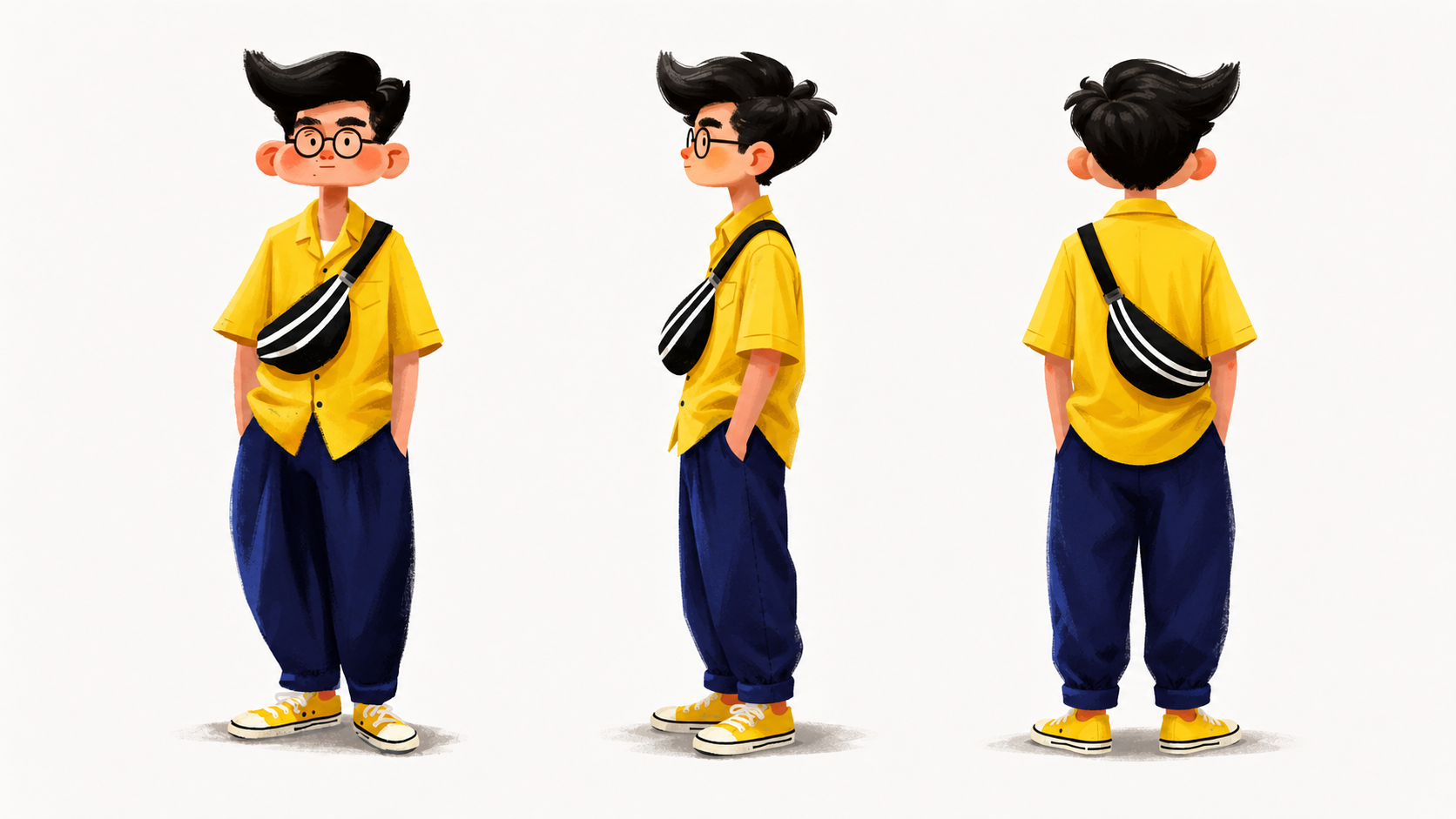
Character sheet with front, side, and back views on a light gray-white background with soft light. Cartoon boy with round glasses, fluffy black short hair, a slightly blushed round face, and a cute look; bright yellow short-sleeve shirt, loose dark blue pants, yellow canvas shoes, and a black chest bag with a white pattern, hands in pockets. Hand-drawn style, soft texture, yellow-blue contrast, natural folds, oversized head, friendly feel. Eye-level full-body layout showing appearance, outfit, and bag details. For character design, concept art, animation, and games.
Nano Banana 2 character style sheet example
02

Localized poster concept

Describe what you want to generate
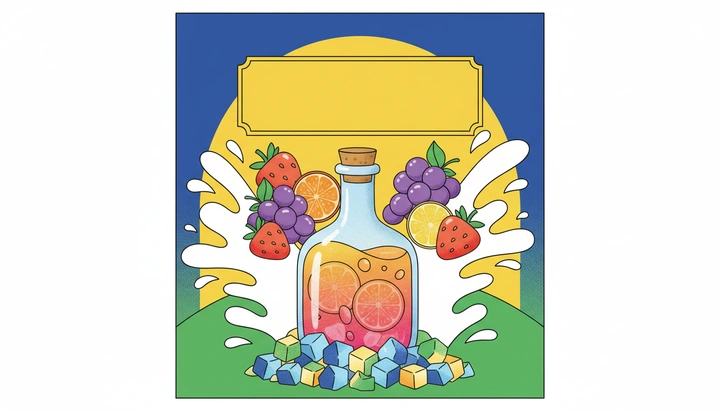
2D flat cartoon poster, front-facing and centered, with a blue, yellow, and green geometric background. A transparent glass bottle with a cork holds an orange-pink fruit drink with visible orange slices and fruit layers. Strawberries, grapes, oranges, and lemons around it, white splashes on both sides, colorful cube candies below, and a blank yellow retro title frame on top. Clean lines, vivid colors, sweet and fresh energy. For drink posters and packaging illustration.
Nano Banana 2 poster concept example

Best settings

Pick the variant by workflow stage: fast ideation first, sharper finishing only when the direction is locked.

Nano Banana 2

Trend-led social post

This balances speed and polish for fast-moving campaigns that still need a distinct look.

Ratio
4:5
Resolution
2K
Nano Banana Pro

Localized campaign poster

Taller frames work well for regional poster crops, paid placements, and event assets.

Ratio
3:4
Resolution
4K
Nano Banana

Idea sprint draft

Use the base model when you need many variations before art direction is approved.

Ratio
1:1
Resolution
1K

Related tools

This tool uses third-party model capabilities and is not affiliated with or endorsed by the original model providers unless explicitly stated.

Frequently asked questions

How do I use Nano Banana 2 as an AI image generator?+

Open Nano Banana 2, describe the subject, mood, style, and output intent, add reference images when they improve consistency, choose a variant and ratio, then generate and review the first variations.

What are the differences between the Nano Banana variants?+

The variants mainly differ in output quality, generation speed, and the stage of the workflow they fit best. A faster variant is useful for direction finding, while a higher-quality variant is better for polished final output.

Does Nano Banana support reference images and style exploration?+

Yes. Reference images can help guide subject direction, style, and layout, which makes Nano Banana suitable for visual exploration and style extension. It is especially useful when you want to iterate on a creative direction across multiple generations.

Does Nano Banana support web search?+

Some Nano Banana variants on the current page support web search. This is more useful when you need fresher context, real-world references, or culture-specific cues, but the actual availability depends on the currently selected variant and settings.

Is Nano Banana good for character consistency?+

It can help with character consistency when you keep the subject description stable and use reference images. It should still be treated as an iterative workflow rather than a guaranteed character-locking system.

When should I use Nano Banana instead of GPT Image?+

If you care more about creative exploration, style range, and a more playful visual tone, Nano Banana is usually the better fit. If you need more controlled, commercial, or high-fidelity image output, GPT Image is often the stronger choice.

Related articles